இடுகைகள்

History of Christmas

படம்
Christmas is one of the most popular festivals around the world. The approaching winter season indicates us that Christmas is around and we usually associate the winter with the Christmas celebration and with 25th December as the birth of Lord Christ. However to your amazement, the history of Christmas dates back over 4000 years and it tells us that celebration during the winter season were common, even way before the Christ was born. It has been celebrated at different places for different reasons and it was quite later that the date of the celebration was fixed to be 25th December. Explore the chronological description of the emergence of Christmas celebrations in the following paragraphs. Since the times of early Mesopotamia celebrations, there were grand celebrations with bonfires, yule log, sharing of gifts, carnivals and parades during the time that is now known as Christmas season in the honor of their chief god, Marduk. It was believed that every year the God had to wage...

What You Need to Keep in Mind

--> Fifteen Laws of Life Love Is The Law Of Life: All love is expansion, all selfishness is contraction. Love is therefore the only law of life. He who loves lives, he who is selfish is dying. Therefore, love for love's sake, because it is law of life, just as you breathe to live. It's Your Outlook That Matters: It is our own mental attitude, which makes the world what it is for us. Our thoughts make things beautiful, our thoughts make things ugly. The whole world is in our own minds. Learn to see things in the proper light. Life is Beautiful: First, believe in this world - that there is meaning behind everything. Everything in the world is good, is holy and beautiful. If you see something evil, think that you do not understand it in the right light. Throw the burden on yourselves! It's The Way You Feel: Feel like Christ and you will be a Christ; feel like Buddha and you will be a Buddha. It is feeling that is the ...

Merry Christmas

படம்

How to create Your own Illustration Image

படம்
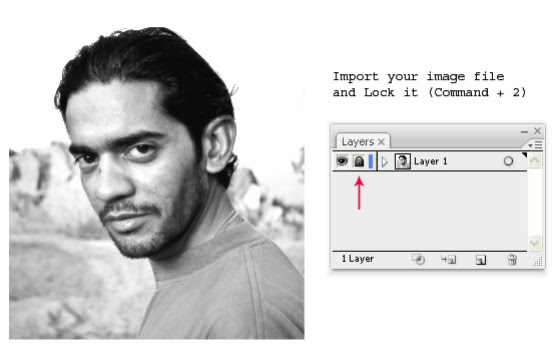
Create a new document and click on File > Place. Select your image/photograph and hit Place to import the image on stage. (Unchecked the Link box if you want to retain the image file permanently in your document). Next, select the image and lock it using Command + 2. Step 2 Depending on the complexity of your image, decide on the number of shades that are forming the image. Here, I’ve defined three different shades. i.e. blank for the brightest parts, single lines for medium shade, and intersecting lines for the darkest shade. You may further play with the number of lines to define different shades. > Step 3 Grab the Line Segment Tool (\) from Tools pallet and draw a horizontal line of width approximately larger than your image. Place it on the top most part of your traceable area and stroke it with any contrasting color. Step 4 Select the line and click on Object > Transform > Transform Each (Alt + Shift + Command + D). Enter -10px for Vertical Move and...

50+ Ms word shortcut keys

படம்
Shortcut Keys Description Ctrl + A Select all contents of the page. Ctrl + B Bold highlighted selection. Ctrl + C Copy selected text. Ctrl + D Open the font dialogue box. Ctrl + E Aligns the line or selected text to the center of the screen. Ctrl + F Open find box. Ctrl + G Open find and replace box. Ctrl + H Also opens find and replace box. Ctrl + I Italicise highlighted selection. Ctrl + J Justify (spread) the text across the page. Ctrl + K Insert link. Ctrl + L Aligns the line or selected text to the left of the screen. Ctrl + M Indent the paragraph. Ctrl + N Open a new document. Ctrl + O Open a document stored on your hard drive. Ctrl + P Open the print window. Ctrl + R Aligns the line or selected text to the right of the screen. Ctrl + S Saves the current document. Ctrl + U Underline highlighted selection. Ctrl + V Paste contents of clipboard. Ctrl + W Closes the current document. Ctrl + X Cut selected text. Ct...

Windows XP Tricks

படம்
Not Viewing Zip Files as Folders If you want to turn off WindowsXP showing Zip files as folders, just run: regsvr32 /u zipfldr.dll ************************************************************** Windows XP genuine validation problem It's easy. Follow these steps: 1) Close WgaTray.exe from task manager 2) Restart your pc in safe mode. 3) Delete WgaTray.exe from c:\Windows\System32. If you can't delete it, try deleting from cmd. 4) Delete WgaTray from c:\Windows\System32\dllcache. (Sometime this file dont exist in this folder, so skip this step). 5) Launch RegEdit from Windows start > Run. 6) Browse the following location: HKEY_LOCAL_MACHINE\SOFTWARE\MICROSOFT\WINDOWS NT\CURRENTVERSION\WinLogon\Notify. 7) Delete the folder 'WgaLogon'. To get rid if this problem in future, turn off automatic update. ********************************* How to delete autorun Virus?? Once a pc is infected with this virus,we you click your hard drives it opens a dialog ...

Self Management

படம்
You are responsible for everything that happens in your life. Learn to accept total responsibility for yourself. If you do not manage yourself, then you are letting others have control of your Life. These tips will help "you" manage "you." Here is a list of things that help you in self management and which will in turn lead you to the path of success: - * Look at every new opportunity as an exciting and new-life experience. * Be a professional who exhibits self-confidence and self-assurance in your potential to complete any task. * Agree with yourself in advance that you will have a good attitude toward the upcoming task. * Frequently ask, "Is what I am doing right now moving me toward my goals?" * Do it right the first time and you will not have to take time later to fix it. * Accept responsibility for your job successes and failures. Do not look for a scapegoat. * Do not view things you do as a "job." View all activities as...